
Custom Software Development in Nigeria: How to Plan, Build and Own Software That Pays for Itself
A practical guide to custom software development in Nigeria: build vs buy, scoping, choosing a partner, contracts and IP, delivery, quality, costs and life after launch.

Short answer: custom software makes sense in Nigeria when your process is part of your advantage, when off-the-shelf tools force you into workarounds, or when dollar-priced subscriptions for many users cost more than owning the system. The projects that succeed start with a business outcome rather than a feature list, keep the first version small, pay in milestones tied to working software, and make sure the company owns the code, accounts and data from day one.
This guide covers the whole journey: deciding whether to build, scoping, choosing a partner, contracts and intellectual property, how delivery should work week to week, quality and security, costs, and what happens after launch. It is written for business owners, founders and managers who are not engineers but will be accountable for the result.
What "custom software" actually means
Custom software is software built for your organisation's specific needs, rather than a product you subscribe to that thousands of other companies also use. It ranges from a small internal tool that replaces a spreadsheet to a full platform your customers use every day.
Common examples in Nigeria include:
Operations tools: inventory, procurement, approvals, field-team management and reporting.
Customer-facing platforms: portals where clients place orders, track deliveries, download statements or book services.
Industry systems: school management, clinic scheduling, property management, cooperative and thrift management.
Fintech products: wallets, lending, savings and payments, which carry their own regulatory requirements.
Software products: SaaS platforms sold to other businesses on subscription.
What these have in common is that they encode how your organisation works. That is both their value and their risk: get the process right and the software becomes an advantage; build the wrong process into code and you have automated a problem.
Build or buy: an honest decision framework
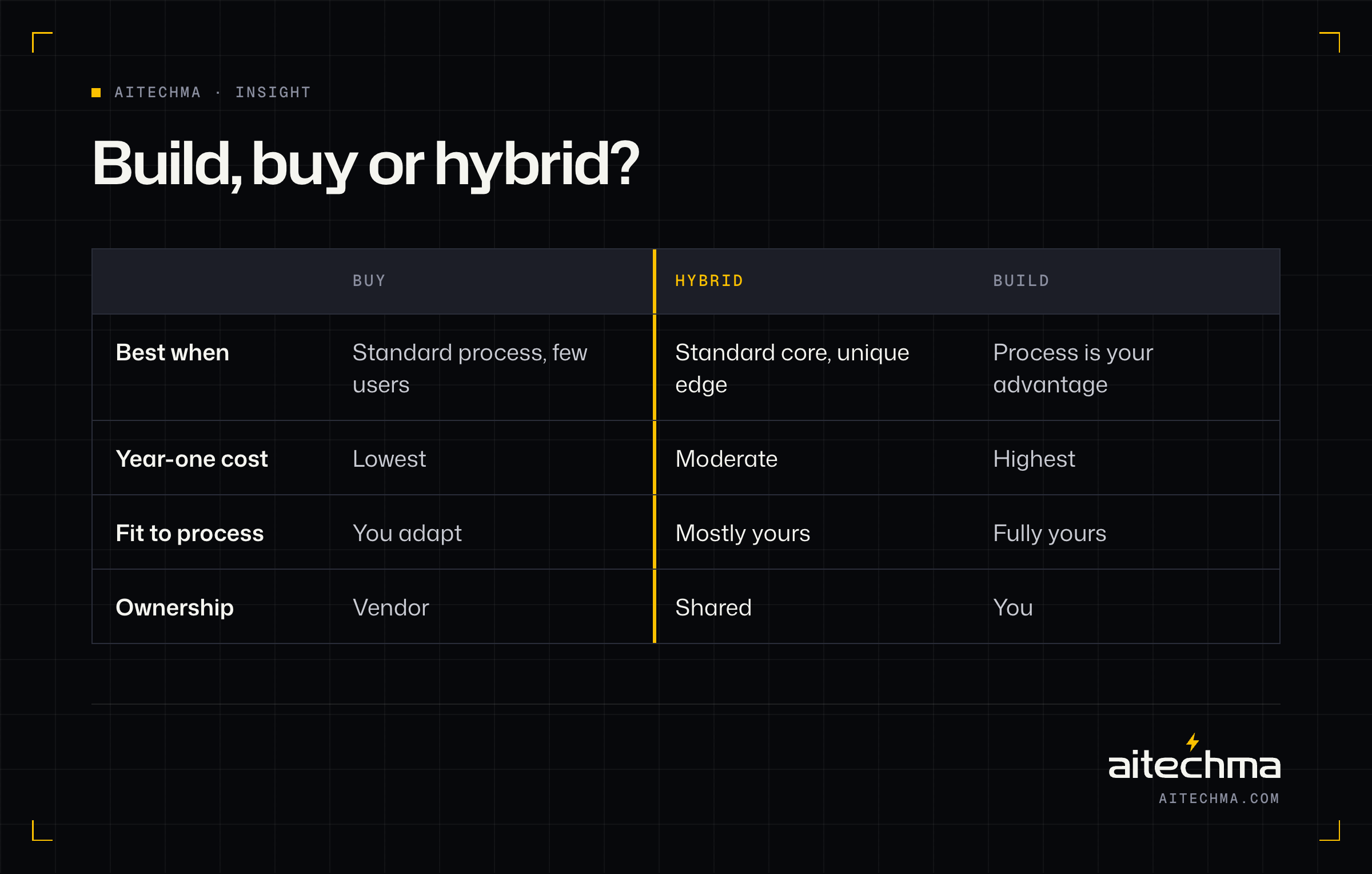
Before spending on custom development, check whether an existing product would do. Buying is usually faster and cheaper to start. Building is usually better when the software is central to how you win.
Buy when:
An existing product fits at least 80% of your needs without awkward workarounds.
The process is standard, such as payroll, basic accounting or email marketing.
You have few users, so subscription costs stay modest.
You do not need deep integration with your other systems.
Build when:
Your process is genuinely different from competitors and that difference matters to customers.
You are stitching several tools together with spreadsheets and manual re-entry.
Per-user subscription fees, often charged in dollars, add up to more than owning a system over three years.
You need control over data location, security or integrations that vendors will not give you.
The software is your product.
Consider a hybrid when a commercial product covers the standard parts and a small custom layer handles what makes you different. For example, standard accounting software plus a custom operations tool that feeds it.
A simple test: list the five most painful manual steps in your process today. If an off-the-shelf product removes most of them, buy. If none does without heavy customisation, build.
The market context
Demand for business software in Nigeria is growing because the market is enormous and largely manual. Nigeria has an estimated 39.7 million MSMEs, and cost is consistently cited as a main barrier to adopting technology [1]. At the same time, specific categories are expanding quickly: one market report projects Nigeria's inventory management software market to more than double between 2025 and 2031 [2], and Nigerian founders have been shifting toward B2B and enterprise software that businesses pay for monthly [3].
For buyers, that means more vendors, wider price ranges and more variation in quality. It also means that well-built software that saves staff time or reduces errors can pay for itself quickly, because so much work is still done by hand.
Start with outcomes, not features
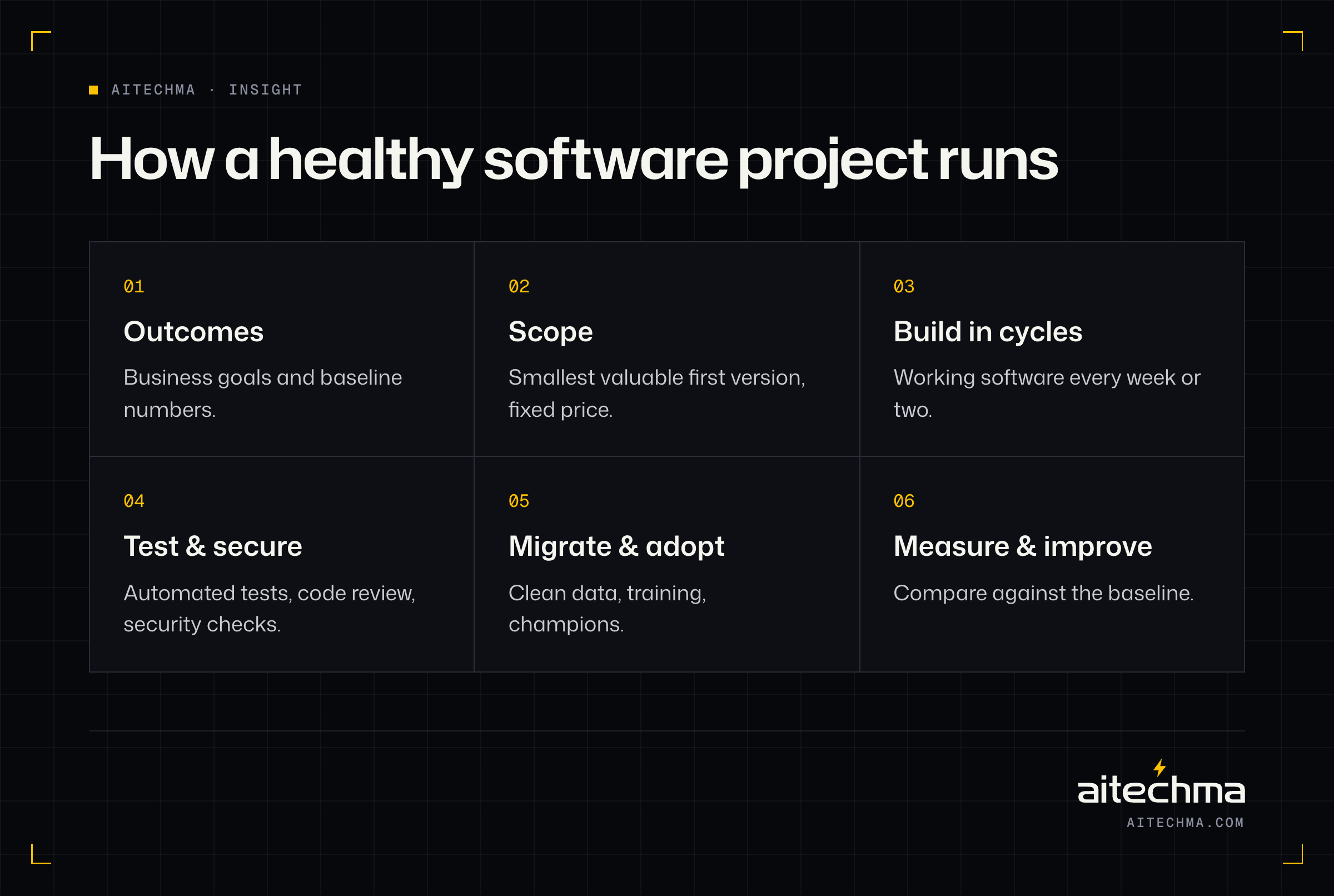
The most common reason custom software disappoints is that it was scoped as a list of features instead of a set of outcomes. "We need a dashboard, user management, notifications and reports" describes software. "We need to cut order processing from two days to two hours and stop losing track of unpaid invoices" describes a result.
Start every project by writing down:
The problem in business terms. What costs money, time or customers today?
Who feels it. Which roles, how many people, how often?
What success looks like in numbers. Hours saved, errors reduced, revenue gained, days cut.
The constraints. Budget range, deadlines, regulations, existing systems that must stay.
Then, and only then, design the features that achieve those outcomes. This keeps the first version small, makes trade-offs obvious and gives you a way to judge whether the project worked.
Scoping a first version that ships
A good first version does one job very well. It is not a smaller copy of everything you eventually want.
Map the current process. Sit with the people who do the work and write down every step, hand-off, spreadsheet and approval. Most organisations discover undocumented steps and exceptions at this stage, and it is far cheaper to discover them on paper than in code.
Pick the highest-value slice. Identify the part of the process that causes the most pain or costs the most money, and make that the first version.
Write user stories with acceptance criteria. "As a warehouse supervisor, I can approve a stock transfer, and the stock levels in both warehouses update immediately." Each story should be testable.
Keep a "not yet" list. Every good idea that is not in the first version goes on a visible list with a reason. This stops scope creep without saying no forever.
Agree what is out of scope. Writing down what the first version will not do prevents most disputes later.
A scoping sprint of one to two weeks typically produces a process map, prioritised user stories, a technical approach, a timeline and a fixed price for the first version. Our MVP development process starts exactly this way.
Choosing a development partner
The partner you choose matters more than the technology. Here are the options and what each is good for.
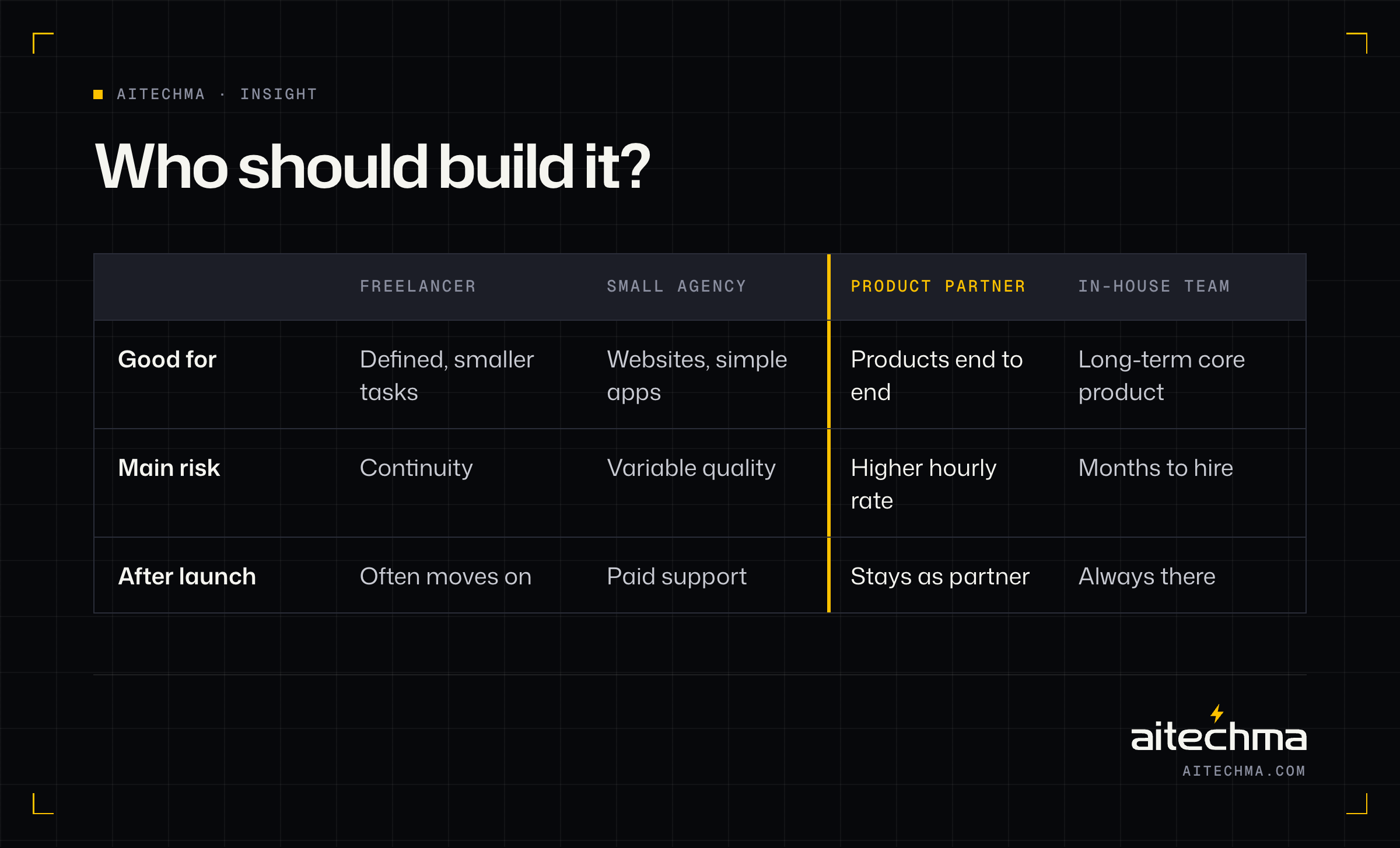
Freelancers can be excellent for clearly defined, smaller pieces of work. The risks are availability, continuity if they move on, and gaps in skills such as design, testing or infrastructure.
Small agencies offer a team under one contract. Quality varies widely: some are strong product teams, others resell freelancers. Ask who will actually work on your project.
Product engineering partners combine scoping, design, engineering and support, and usually stay involved after launch. They cost more per hour than freelancers but often less per outcome because fewer things go wrong.
In-house teams give you full control and long-term capacity, but hiring takes months and senior engineers are scarce. Many companies start with a partner and hire in-house as the product matures; a partner can also help you hire.
Large consultancies and system integrators suit very large organisations and enterprise platforms, at a price to match.
How to evaluate a partner
Look at live work, not mockups. Ask to use products they have built and speak to a client.
Meet the people who will build your software, not only the sales team.
Ask how they would approach your problem. Good partners ask questions about your business before talking about technology, and are willing to tell you what not to build.
Check how they handle change. Requirements always change; you want a clear, fair process for it.
Ask about after launch. Support, fixes, updates and knowledge transfer.
Look at their own discipline. Do they use version control, automated tests, code review and documented deployments? Ask them to describe their process.
Our guide to choosing a technical consultant explains how an independent review can help if you are comparing proposals.
Contracts, payments and intellectual property
A clear contract protects both sides and prevents most disputes. Make sure yours covers:
Scope and acceptance. What will be delivered, and how you will confirm it works. Attach the user stories and acceptance criteria.
Milestone payments. Payments tied to working software you can see, not to time passing. A deposit followed by milestones is normal; 100% upfront is a red flag.
Change requests. How new or changed requirements are estimated, approved and priced.
Intellectual property. All code, designs and documentation you pay for should be assigned to your company. Check that open-source licences used are compatible with your plans.
Accounts and access. Code repositories, cloud accounts, domains and app store accounts should be in your company's name, with the partner given access.
Confidentiality. An NDA before you share sensitive details, and confidentiality clauses in the contract.
Warranty and support. A period after launch during which defects are fixed at no cost, and terms for ongoing support.
Data protection. How personal data is handled, in line with the Nigeria Data Protection Act.
Exit. What happens if either side ends the relationship: handover of code, documentation and credentials.
If you only remember one thing from this section, make it this: own your accounts from day one. Recovering a repository or cloud account from a departed developer is one of the most painful and common problems we see.
How delivery should work week to week
Good software teams work in short cycles and show progress constantly. Here is what a healthy engagement looks like.
Weekly or fortnightly demos of working software, not slides or status reports. You should be able to click through what was built.
A shared backlog you can see, showing what is done, in progress and next.
One point of contact on each side who can make decisions quickly.
Regular releases to a test environment where you and your staff can try features before they go live.
Honest reporting. When something is late or harder than expected, you hear about it early, with options.
If a team disappears for a month and returns with a "finished" system, you have lost every chance to correct course cheaply. Ask any potential partner how often you will see working software. The answer should be "every week".
Quality you cannot see (but will pay for if it is missing)
Two systems can look identical on screen and differ enormously in quality underneath. These are the invisible parts that decide whether software keeps working:
Automated tests on critical flows, so new features do not break old ones.
Code review, where a second engineer checks every change before it is merged.
Clear architecture and documentation, so another team could take over if needed.
Monitoring and alerts, so problems are found before users report them.
Backups and restore drills, so data loss is recoverable.
Performance testing, so the system copes with peak days such as month-end or school resumption.
These do not appear in demos, which is why cheap quotes often leave them out. Ask about each one explicitly.
Security in custom software
Security is easier to build in than bolt on. At a minimum, expect:
Authentication and authorisation on every request, so users can only see and change what they are allowed to.
Validation of all input, to prevent injection attacks.
Encryption of data in transit and sensitive data at rest.
Secrets kept out of code, stored in secure vaults.
Audit logs of important actions, especially anything involving money or personal data.
Dependency updates to patch known vulnerabilities.
A security review or penetration test before launch for systems handling money or sensitive data.
AI coding tools have made it faster to produce software, but not safer by default. In Veracode's 2025 research, AI models chose an insecure approach in about 45% of tested coding tasks [4]. Speed is valuable; review is essential. If you already have an app built quickly with AI tools or by a developer who has moved on, our app rescue service starts with a written audit.
Where AI fits in custom software
AI has changed both what custom software can do and how it is built. Both changes matter to buyers.
AI as a feature. Many systems now benefit from AI capabilities: reading invoices and documents, classifying customer requests, drafting replies for staff to approve, answering questions from an internal knowledge base, or flagging unusual transactions. These features can remove hours of manual work. They also need care: the AI should work from your own data, have limited permissions, show its sources where possible and hand over to a person when unsure. Budget for the running cost too, because AI providers charge by usage. Our AI agent development page explains how we approach this.
AI in the build process. Engineering teams increasingly use AI coding assistants. Used well, they speed up routine work and free engineers for design and review. Used carelessly, they produce code that looks correct but hides security and quality problems. Ask any partner how they use AI tools and how they review what those tools produce. Good answers mention code review, automated tests and security checks on every change.
What does not change. AI does not remove the need to understand your process, scope carefully, test properly and plan adoption. Projects still succeed or fail on clear outcomes and good decisions.
A practical starting point. If you are unsure where AI could help, list the tasks your team repeats most often that involve reading, sorting or summarising information: invoices, applications, support messages, reports. Those are usually the best first candidates. Start with one, measure the time saved and the error rate, and expand only when the results are clear. Keep a person in the loop for anything involving money, customers' personal data or decisions that are hard to reverse.
Technology choices for non-technical owners
You do not need to choose the technology yourself, but you should understand the principles behind good choices:
Choose widely used technology. Popular, well-supported frameworks make it easier to hire engineers and find help later.
Favour boring over trendy. Proven tools reduce risk. Novel technology should solve a problem the proven tools cannot.
Plan for the people who will maintain it. The best stack is one your future team can work with.
Keep it as simple as possible. Microservices, multiple databases and complex infrastructure are rarely needed for a first version.
Think about where data must live. Some sectors, especially payments, have rules about storing data in Nigeria.
Ask your partner to explain their recommendations in plain language and why they suit your situation.
What custom software costs
The cost of custom software depends on scope, complexity, integrations, quality expectations and the team. Instead of a single number, budget across these lines:
Cost line | When | Notes |
|---|---|---|
Discovery and scoping | Before build | Usually fixed price, one to two weeks |
Design | Before and during build | Prototypes tested with users |
Engineering | During build | The largest share, priced by milestone |
Testing and security | During build | Do not let this be cut to save money |
Infrastructure | Ongoing | Hosting, monitoring, backups |
Support and maintenance | Ongoing | Fixes, updates, small improvements |
New features | Ongoing | Based on what users need after launch |
Rates for experienced engineers in Nigeria are commonly quoted at around $25 to $45 per hour, compared with $35 to $70 in Eastern Europe [5], which is one reason many international companies build here. Our project estimator gives an instant range for common types of project, and a scoping sprint turns that into a fixed price.
Data migration: the forgotten workstream
Most new systems replace something: spreadsheets, an old system or paper records. Moving that data is often underestimated.
Inventory your data sources early, including spreadsheets on individual laptops.
Clean before you move. Duplicates, inconsistent formats and missing values cause problems in the new system.
Map old fields to new ones, and decide what to do with data that does not fit.
Rehearse the migration on a copy before the real one.
Run old and new in parallel for a short period, comparing results.
Plan the cut-over day with clear responsibilities and a fallback.
Change management: getting people to use it
Software that staff do not use has no value. Adoption is a project in its own right.
Involve users early. The people who do the work should see prototypes and influence design.
Train by role, with short sessions focused on the tasks each person does.
Appoint champions in each team who learn first and help colleagues.
Remove the old way. If the spreadsheet stays available, people will keep using it.
Measure usage and follow up with teams that are not adopting.
Collect feedback and show that it leads to improvements.
Celebrate early wins. When the new system saves a team a day of work or prevents a costly mistake, tell everyone. Visible success is the most persuasive training there is.
Life after launch
Launch is the midpoint, not the finish line. Plan for:
A stabilisation period of a few weeks where bugs found by real users are fixed quickly.
Monitoring and support with agreed response times.
Regular updates to libraries, frameworks and infrastructure.
A roadmap for the next improvements, driven by data and user feedback.
Periodic reviews of whether the software is delivering the outcomes you set at the start. Compare the numbers with the baseline you recorded before the build, and share the results with the team that uses the system every day.
Our Launch Partner Program covers the first month after launch for exactly this reason.
Signs your organisation is ready
Custom software works best when the organisation is ready for it, not just when the need is real. Look for these signs before you commit:
Someone owns the outcome. A named leader cares about the result and has time to make decisions.
The process is understood, or you are willing to understand it. If nobody can describe how work flows today, start with process mapping.
Users are willing to change. If the people doing the work resist any change, plan for adoption from the start.
The budget covers more than the build. Hosting, support and improvements after launch are funded.
You can wait for value. A first version takes weeks to months; quick wins are possible, but the full return comes over time.
If several of these are missing, a short discovery engagement or a fractional product manager can help you get ready before investing in a full build.
How long does it take?
Timelines depend on scope and decision speed, but these ranges are typical for focused first versions built by an experienced team:
Project type | Typical first-version timeline |
|---|---|
Internal tool replacing a spreadsheet | 4–8 weeks |
Customer portal or dashboard | 6–10 weeks |
Operations system with integrations | 8–14 weeks |
Mobile app with backend and admin | 10–16 weeks |
Multi-tenant SaaS platform | 12–20 weeks |
Regulated fintech product | 12–24 weeks |
The slowest projects are rarely slow because of engineering. They are slow because decisions wait, content and data arrive late, or scope keeps growing.
Rebuild or improve an existing system?
Many organisations already have software that disappoints: an old system nobody wants to touch, or an app built quickly that keeps breaking. The instinct is to rebuild from scratch. Sometimes that is right; often it is not.
Improve when:
The core data model and business logic are basically sound.
Problems are concentrated in a few areas, such as performance, a confusing interface or missing tests.
The system works for users, even if it is unpleasant for developers.
Rebuild when:
The architecture cannot support what the business now needs.
Security problems are structural rather than isolated.
The technology is so outdated that nobody can hire for it or patch it.
Fixing would cost more than replacing, according to an honest estimate.
Either way, start with an independent audit. A week of review usually shows whether the system can be stabilised and improved in stages, which is almost always less risky than a big-bang rewrite.
A worked example: a distributor's operations system
To show how these ideas fit together, here is a composite example based on projects of this kind. The details are illustrative.
A Lagos distributor of consumer goods supplies about 400 retailers across the south-west. Orders arrive by phone and WhatsApp, are typed into a spreadsheet, printed for the warehouse and re-typed into accounting software. Sales reps track their own customers in notebooks. Management sees last month's numbers in the middle of this month.
The outcome. The owners set three goals: cut the time from order to dispatch from two days to same-day, stop the errors that cause wrong deliveries, and see sales and stock daily rather than monthly.
Build or buy. They tried two off-the-shelf distribution tools. Both handled stock well but could not cope with their credit rules (different limits and payment terms per retailer, approved by area managers) or their reps' habit of taking orders on WhatsApp. They chose a hybrid: keep their accounting software, build a custom operations system, and integrate the two.
Scoping. A two-week discovery mapped the process with reps, warehouse staff and finance. It found eleven undocumented steps, including a manual credit check by phone that caused most of the delays. The first version was scoped to three things: order capture (including orders forwarded from WhatsApp), credit approval and warehouse picking, plus a daily dashboard.
Delivery. The team built in fortnightly cycles. Reps tested order capture on their own phones from week three, and their feedback changed the design twice, both times for the better. Data migration (retailers, prices, credit limits and opening balances) was rehearsed twice on a copy before go-live.
Adoption. The old order spreadsheet was made read-only on launch day. Two reps who had helped test the app became champions and trained the others.
Results after three months. Most orders were dispatched the same day, wrong deliveries fell sharply because the warehouse picked from the system rather than handwritten notes, and management reviewed the dashboard every morning. Version two, informed by usage data, added route planning for delivery vans.
The lesson is not that every project goes this smoothly. It is that clear outcomes, a small first version, involved users and planned migration are what make the difference.
Integrations with Nigerian systems
Most business software in Nigeria needs to talk to other systems. Plan integrations early, because each one adds design, testing and error handling.
Payments. Nigerian gateways for cards, transfers and USSD; virtual accounts for collecting transfers; payouts to suppliers or staff. Payment statuses must be verified and reconciled, not just trusted.
Banking. Bank statement imports or open-banking style data for reconciliation and lending decisions.
Identity. BVN and NIN verification for onboarding customers or agents, scaled to the risk of each use.
Messaging. SMS, email and WhatsApp for notifications, approvals and customer updates. Message costs grow with usage, so design notifications carefully.
Accounting. Exporting or syncing invoices, payments and journals to your accounting software.
Government and regulators. Tax, pension or sector-specific reporting, where formats and deadlines are set externally.
For each integration, ask: what happens when the other system is slow, down or returns an error? Robust software handles those cases gracefully and alerts someone when manual action is needed.
Measuring return on investment
Custom software is an investment, so measure it like one. Set the baseline before you build, then measure the same things after launch.
Time saved. Hours per week spent on the process before and after, multiplied by the cost of those hours.
Errors avoided. Wrong deliveries, billing mistakes, duplicate payments and their cost to fix.
Revenue effects. Faster quotes, fewer abandoned orders, more customers served with the same team.
Cash flow. Faster invoicing and collection often pays for a system on its own.
Risk reduction. Fewer compliance gaps, better audit trails, less dependence on one person's spreadsheet.
A simple calculation is enough: if the system saves forty staff hours a week and prevents a few costly errors a month, you can estimate the payback period in months. Share it with your team so everyone understands why the change matters.
Total cost of ownership over three years
The build price is only part of what software costs. Compare options over three years, not just the first invoice.
Off-the-shelf subscription | Custom build | |
|---|---|---|
Year 1 | Setup plus subscriptions for every user | Discovery, design and build, plus hosting |
Years 2–3 | Subscriptions, often priced in dollars and rising with users | Hosting, maintenance and new features |
Fit to process | You adapt to the product | The product adapts to you |
Control | Vendor decides roadmap and pricing | You decide |
Exit | Export what the vendor allows | You own the code and data |
Subscriptions are usually cheaper in year one. Custom software often becomes cheaper by year two or three, especially with many users or dollar-priced licences, and it carries value as an asset your business owns.
Governance: keeping the project on track
Even small projects benefit from light governance. It does not need to be bureaucratic.
A sponsor who owns the business outcome and can make final decisions.
A product owner who works with the team every week, answers questions and accepts features.
A short fortnightly review of progress, budget, risks and upcoming decisions.
A visible risk list with owners, so problems are discussed before they become crises.
A decision log recording important choices and why they were made, which helps when people change.
The single most effective governance habit is attending the demos. Sponsors who see working software every fortnight catch misunderstandings early and keep the team focused on outcomes.
Working with a remote or offshore partner
Many Nigerian businesses now work with partners in another city or country, and many international companies build with Nigerian teams. Distance works well with a few practices:
Overlapping hours. Agree a daily window when both sides are available. Lagos runs on West Africa Time (UTC+1), which overlaps fully with UK and European working days.
Written communication. Decisions, requirements and changes written down in a shared tool, not only discussed on calls.
Video demos. Recorded or live demos so stakeholders who could not attend can catch up.
Visits at key moments. An in-person workshop at kick-off and before launch builds trust quickly.
Clear escalation. Who to call when something urgent goes wrong, on both sides.
If you are hiring engineers to join your own team rather than outsourcing a project, see our guide to hiring Nigerian developers.
Glossary for business owners
Discovery or scoping: the short phase where requirements, process and approach are agreed before building.
User story: a short description of something a user needs to do, with criteria to test it.
Backlog: the prioritised list of work to be done.
Sprint or cycle: a fixed period, often one or two weeks, ending with working software.
MVP (minimum viable product): the smallest version that delivers real value and lets you learn.
Integration: a connection between your software and another system.
Technical debt: shortcuts that make future changes slower and riskier.
Staging environment: a test copy of the system where changes are checked before going live.
Acceptance criteria: the conditions a feature must meet to be considered done.
Total cost of ownership: everything the software costs over its life, not just the build.
Ten mistakes to avoid
Scoping features instead of outcomes.
Trying to build everything in version one.
Choosing the cheapest quote without checking what it leaves out.
Paying 100% upfront.
Letting a developer own your repositories and cloud accounts.
Skipping discovery to "save time".
Not involving the people who will use the software.
Ignoring data migration until the last week.
Cutting testing and security when the budget tightens.
Treating launch as the end of the project.
Questions to ask before you sign
Can we use software you have built and speak to one of your clients?
Who exactly will work on our project, and what have they built before?
How do you scope, and what do we receive at the end of scoping?
How often will we see working software?
How do you handle changes to requirements?
What testing, code review and security practices do you follow?
Who owns the code, designs, documentation and accounts?
What support do you provide after launch, and on what terms?
What happens if a key team member leaves?
How would you approach our problem, and what would you not build yet?
How Aitechma can help
Aitechma is a software engineering company in Ikeja, Lagos, building custom software for businesses and founders in Nigeria and abroad since 2017. We start with your outcomes, scope a first version that ships, build in weekly demos with milestone payments, and make sure you own everything. Our team has built fintech, SaaS and edtech products used by hundreds of thousands of people.
See our software development services, get an instant estimate or book a scoping call.
Frequently asked questions
When an off-the-shelf product cannot fit your process without heavy workarounds, when you are stitching tools together with spreadsheets, when per-user subscriptions cost more than owning a system over three years, or when the software is your product.
It depends on scope, integrations and quality. Budget for discovery, design, engineering, testing, infrastructure and ongoing support. Experienced Nigerian engineers are commonly quoted at around $25 to $45 per hour; a scoping sprint turns your idea into a fixed price.
Focused first versions typically take four to eight weeks for an internal tool, six to ten weeks for a portal and eight to fourteen weeks for an operations system with integrations. Regulated and multi-tenant products take longer.
Your company. The contract should assign all code, designs and documentation to you, and repositories, cloud accounts and domains should be in your company's name.
Start with an independent audit. Improve in stages when the data model and logic are sound; rebuild only when the architecture or security problems are structural or fixing would cost more than replacing.
Sources
- PwC Nigeria. MSME Survey Report 2024 (citing SMEDAN/NBS) (2024)
- Ken Research. Nigeria inventory management software market, 2026–2031 (2026)
- StreamlineFeed. Nigeria tech boom shifts toward enterprise software (2026)
- Veracode. AI-generated code poses major security risks in nearly half of all development tasks (Jul 2025)
- The Scalers. Offshore software development rates by country (2026)
Need help with software development?
Talk to the Aitechma team in Ikeja about your product, timeline and the fastest path to a working release.
See software development