
Mobile App Development in Nigeria: The 2027 Guide to Cost, Timelines, Android-First Design and Launch
How to build a mobile app in Nigeria in 2027: native vs cross-platform, what it costs, Android-first design for low-end phones and data, payments, app store launch and growth.
Short answer: a focused mobile app for Android and iOS, with its backend and an admin dashboard, is usually a project of a few months, not a few weeks, and its price depends far more on features, integrations and quality than on the number of screens. In Nigeria the most important design decisions are the ones generic guides ignore: building for mid-range and budget Android phones, patchy networks and expensive mobile data; making payments and identity checks feel trustworthy; and planning how the app will actually get its first thousand users.
This guide walks through every decision in order: whether you need an app at all, native or cross-platform, what drives cost, how to design for Nigerian conditions, the backend nobody sees, payments, security, testing, store launch and growth. It is written for founders, product owners and business leaders who want to brief a team with confidence.
First question: do you actually need an app?
An app is a commitment. Users must find it, download it, give it space on their phone and keep it updated. Before you spend, check whether a well-built mobile website or web app would do the job.
You probably need a native mobile app if:
Users will open it several times a week, such as for payments, savings, deliveries, learning or messaging.
You need device features: camera, location in the background, push notifications, biometrics or offline storage.
Trust matters and an app store listing helps, as with fintech and health products.
You are building a product that is the business, not a marketing channel for another business.
A mobile web app may be enough if:
Users visit occasionally, for example to check a status or place an occasional order.
You mainly need forms, content and payments that work well in a browser.
You want to test demand before investing in apps.
Many successful Nigerian products start with a responsive web app, prove the core workflow and then build native apps for their most active users. Others start with an Android app because their users live on their phones. Both can be right. The wrong move is building three platforms before you know which one your users prefer.
The Nigerian mobile context going into 2027
Designing an app for Nigeria without understanding the market is the most common cause of failed launches we see. A few realities shape almost every decision.
Connectivity is widespread but uneven. Nigeria had about 157 million internet subscriptions by May 2026, with broadband penetration around 56% [1]. That is a huge audience, but many users connect on mobile networks that slow down, drop out or cost a lot per megabyte.
Android dominates. Most Nigerian smartphone users are on Android, and many on entry-level or mid-range devices with limited storage and memory. iOS users are fewer but often have higher spending power, which matters for some products.
Data is expensive relative to income. Users notice large downloads and data-hungry apps, and uninstall them. Small app size and low data use are features, not technical details.
Business happens on WhatsApp. Nearly half the MSMEs in one IFC survey use WhatsApp for marketing [2]. Your users already expect to reach you there, and many will prefer a WhatsApp conversation to an in-app chat.
Trust is earned slowly. Especially in fintech, users have seen fraud, failed transfers and apps that disappeared. Clear pricing, visible support and reliable behaviour do more for adoption than clever features.
Keep these in mind through every section below.
Native, cross-platform or web: choosing your approach
There are three main ways to build a mobile product. Each is a sensible choice for some projects.
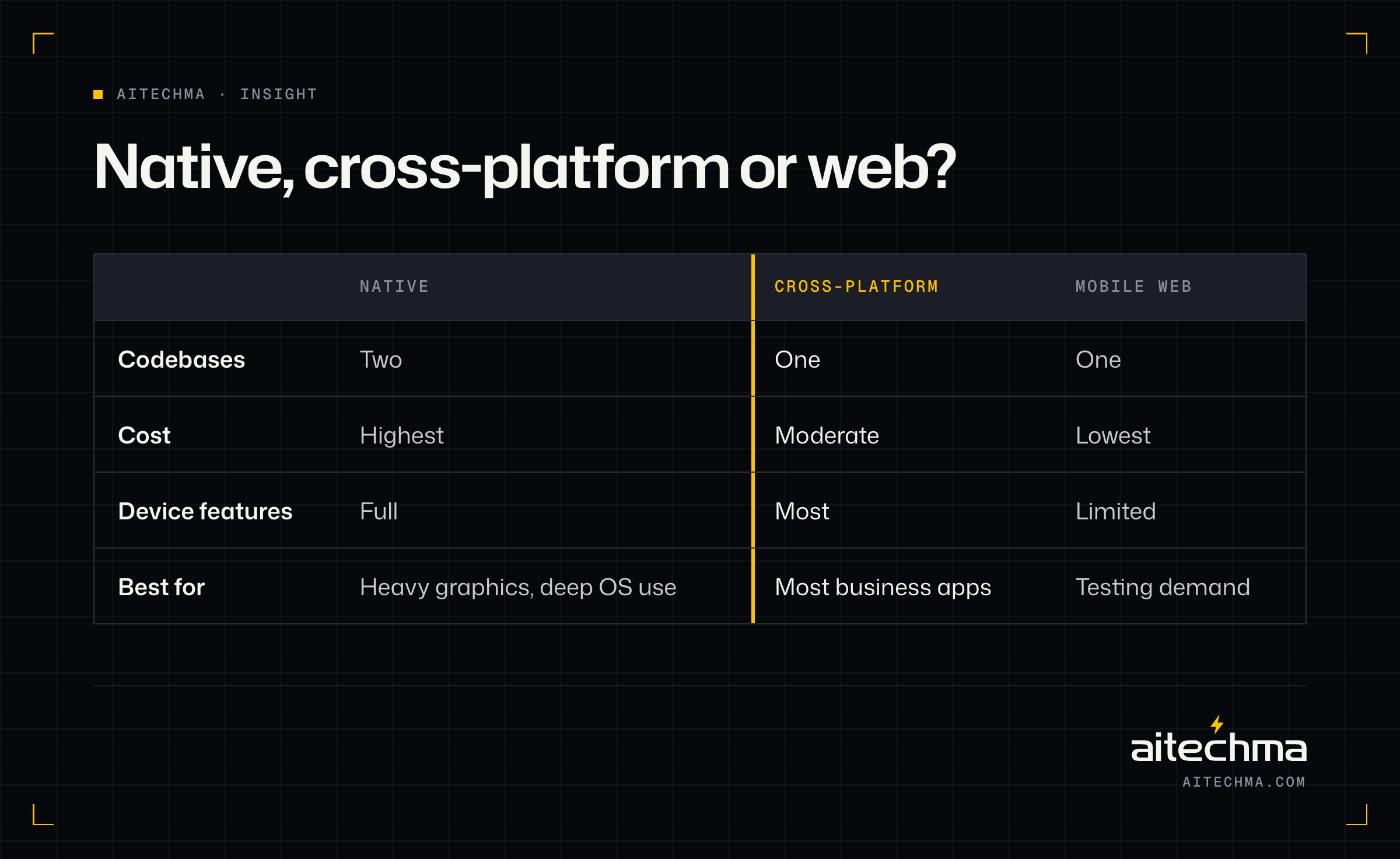
Native apps are built separately for each platform, typically in Kotlin for Android and Swift for iOS. They give the best performance and full access to device features, but you build and maintain two codebases, which costs more over time.
Cross-platform apps are built once in a framework such as Flutter or React Native and run on both Android and iOS. For most business apps, fintech, commerce, learning and service apps, they deliver near-native quality at a much lower cost, with one team and one codebase. This is what we recommend for most Nigerian startups and businesses.
Progressive web apps and mobile web apps run in the browser and can be installed to the home screen. They are cheapest to build and update, but have more limited access to device features and a weaker presence in app stores.
Choose native when you need heavy graphics, complex background processing or the very latest platform features on day one. Choose cross-platform for most products that need to be on both stores at a sensible cost. Choose web when you are testing demand or users visit only occasionally.
Android first, or both stores at once?
Because Android is so dominant in Nigeria, many products launch on Android first. This halves the store work in the early weeks and focuses testing on the devices most of your users carry.
Launch on both at once if:
Your target users are diaspora customers, corporate users or high-income consumers, where iOS share is higher.
You are building for a business or institution that has standardised on iPhones.
Your investors or partners expect both stores at launch.
With a cross-platform framework, adding iOS later is far cheaper than building a second native app, so starting on Android does not lock you in.
What does a mobile app cost in Nigeria?
There is no honest single number, but there is an honest structure. A mobile product usually has three parts, and each costs money:
The app itself: the screens, navigation, offline behaviour, device features and store builds.
The backend: the server, database, accounts, business rules, notifications and integrations the app talks to.
The admin dashboard: a web tool your team uses to manage users, content, transactions and support.
Buyers often budget for the first and forget the other two. A quote that only covers screens is not a quote for a working product.
The biggest cost drivers are, in rough order:
Integrations. Payments, bank transfers, identity verification, maps, SMS and WhatsApp, each with its own error handling.
User types. A marketplace with buyers, sellers, riders and admins is four products in one.
Real-time features. Live tracking, chat and instant updates need more backend work and testing.
Offline behaviour. Making an app work without signal, then sync correctly, is valuable and takes care.
Compliance. Fintech, health and education apps may carry rules about consent, data storage and audit trails.
Design quality. Custom, tested design costs more than adapting a kit, and usually pays for itself in conversion and retention.
As a rule of thumb, a focused first version with one core user journey, one or two integrations and an admin dashboard is a project of roughly two to three months with a small senior team. Fintech, marketplace and real-time products take longer. For an instant range for your idea, use our project estimator; it includes platform, feature and compliance choices.
Designing for Nigerian users
Good mobile design in Nigeria starts with the phone in your user's hand, not the one on the designer's desk.
Design for low-end and mid-range Android
Keep the download small. Every megabyte matters to users on prepaid data and phones with little free storage. Compress images, avoid bundling large assets and remove unused libraries.
Keep memory use low. Budget phones close apps that use too much memory in the background. Test on real budget devices, not just emulators.
Prefer simple animations. Smooth on a flagship can mean stuttering on a budget phone. Animate with purpose and test on the slowest device you support.
Design for patchy networks
Assume requests will fail. Show helpful messages, retry sensibly and never leave users unsure whether a payment went through.
Cache what users need. Show the last known data immediately, then refresh in the background.
Make actions safe to repeat. If a user taps "send" twice on a slow connection, the backend should process it once. This is called idempotency, and it is essential for payments.
Queue work offline. Field, delivery and learning apps should let users keep working without signal and sync later.
Design for trust
Show the full cost before confirmation. Fees, charges and totals, in naira, before the user commits.
Confirm every important action clearly. Receipts, references and timestamps users can screenshot and share.
Make help visible. A support option, ideally a WhatsApp link with the right context pre-filled, on every important screen.
Use familiar patterns. Users trust apps that behave like the banking and payment apps they already use.

Design for onboarding
Most apps lose the majority of new users in the first session. The onboarding flow is where this is won or lost.
Ask for as little as possible up front. Let users see value before asking for documents.
Explain why you need each permission and each piece of data, especially BVN, NIN and location.
Save progress. If KYC fails halfway because of a weak connection, users should not start again.
Measure every step. Analytics on each onboarding screen show you exactly where people drop off.
The backend nobody sees
The backend decides whether your app is fast, reliable and secure. It is also where most technical debt hides.
A sound backend for a mobile product includes:
Authentication and authorisation: secure sign-in, session handling, and checks on every request so one user can never see another's data.
A clear data model: designed around your business, with room to grow.
APIs designed for mobile: small responses, pagination and versioning, so old app versions keep working after you release new ones.
Notifications: push, SMS, email and WhatsApp, with preferences and rate limits.
Background jobs: for anything slow, such as reports, reconciliation and bulk messaging.
Monitoring and logs: so your team hears about problems before users complain.
An admin dashboard: for your operations and support teams.
Our backend and API development team builds these as part of every app, because an app without a dependable backend is only a prototype.
Payments, identity and money flows
If your app moves money, the payment layer deserves more attention than any screen.
Choose providers that fit your licence and costs. Nigerian gateways and payment providers support cards, transfers, USSD and virtual accounts. Your choice depends on your licence or partner bank, fees and the methods your users prefer.
Treat payment status as uncertain until confirmed. Use webhooks and verification calls, not just the response the app receives.
Reconcile. Compare your records with your providers' settlement reports every day. Differences are bugs or fraud, and both need catching early.
Use a proper ledger for balances. If your app holds balances, every movement should be recorded as a double-entry ledger, not a single number that changes.
Verify identity proportionately. BVN and NIN checks, liveness and document verification, scaled to the limits and risks of each user tier.
Fintech has its own rules on top of this. If your app holds or moves money, read our guide to wallet and payment app development and lending app development before you scope.
Security basics every app needs
Security problems are expensive, embarrassing and, in regulated sectors, a compliance issue. These basics should be in every quote:
No secrets in the app. API keys and credentials that grant access belong on the server, not inside the app where they can be extracted.
Encrypted traffic everywhere, with certificate checks for sensitive apps.
Secure local storage for tokens and sensitive data, using the platform's secure storage.
Server-side checks for everything that matters. Never trust the app to enforce prices, limits or permissions on its own.
Rate limits and fraud checks on sign-in, OTP, transfers and anything attackers might abuse.
Dependency updates so known vulnerabilities in libraries are patched.
A penetration test before launch for apps that handle money or sensitive data.
Testing on real devices and real networks
An app that works on the developer's phone on office Wi-Fi has not been tested. Real testing for Nigerian users includes:
A device lab of popular budget and mid-range Android phones, plus a couple of iPhones.
Network throttling to simulate slow and unreliable connections.
Interrupted flows: calls arriving mid-payment, the app being closed during KYC, the phone running out of battery.
Accessibility checks for text size, contrast and screen readers.
Automated tests on critical flows so new releases do not break sign-up or payments.
A beta group of real users before public launch, ideally using internal testing tracks on both stores.
App store launch
Getting into the stores takes planning, especially for regulated categories.
Developer accounts in your company's name, created early, because verification can take time.
Store listings that sell: a clear name, a short description that says what the app does in the first line, screenshots showing the main benefit and a short video if possible.
Privacy declarations that match exactly what the app collects and why.
Review readiness: test accounts for reviewers, explanations of why you need sensitive permissions, and documentation for financial and lending apps, which often face extra review requirements.
Staged rollout: release to a small percentage of users first and watch crash rates and reviews before going to everyone.
Getting found in the app stores
Most users discover apps by searching the store, so treat your listing like a landing page.
Use the words users search for. If people search "savings app" or "JAMB practice", those phrases belong in your title, subtitle and description, written naturally.
Lead with the benefit. The first line of your description and your first two screenshots should say what the app does for the user, not list features.
Show real screens. Screenshots of the actual app with short captions convert better than abstract artwork.
Earn reviews at the right moment. Ask for a rating after a user completes something satisfying, such as a successful transfer or a good test score, never after an error.
Reply to reviews. Prospective users read how you respond to complaints. A calm, helpful reply can turn a one-star review into a reason to trust you.
Update the listing. Refresh screenshots and descriptions when you add important features, and test different versions to see which converts better.
Localise where it helps. Nigerian English phrasing, naira prices in screenshots and familiar examples make a listing feel built for local users rather than translated for them.
Measuring what matters after launch
Downloads are vanity. The numbers that tell you whether your app is working are:
Activation: the share of new users who complete the key first action, such as a first transfer, first order or first lesson.
Retention: how many users come back after a day, a week and a month.
Funnel drop-off: where users abandon onboarding, checkout or KYC.
Crash-free sessions and app-not-responding rates, especially on budget devices.
Support contacts per active user, a sign of confusing design or unreliable features.
Revenue per active user, once you charge.
Set these up before launch. Retrofitting analytics after users have arrived means you lose the most important early data.
Getting your first thousand users
Many apps launch to silence. A launch plan matters as much as the build.
Start with a specific group, not "everyone in Nigeria": students preparing for a particular exam, traders in one market, riders in one city.
Use the channels they already use: WhatsApp communities, Instagram and TikTok creators, campus ambassadors, trade associations and partnerships.
Make the first use valuable immediately, so word of mouth starts.
Offer a reason to invite others, where it makes sense, such as referral rewards with clear limits.
Fix what early users hit, fast. Your first thousand users decide your reviews and your reputation.
Our Launch Partner Program exists because this phase is where many good apps stall: we stay for the first month after launch to run exactly this kind of first-revenue sprint.
A realistic project timeline
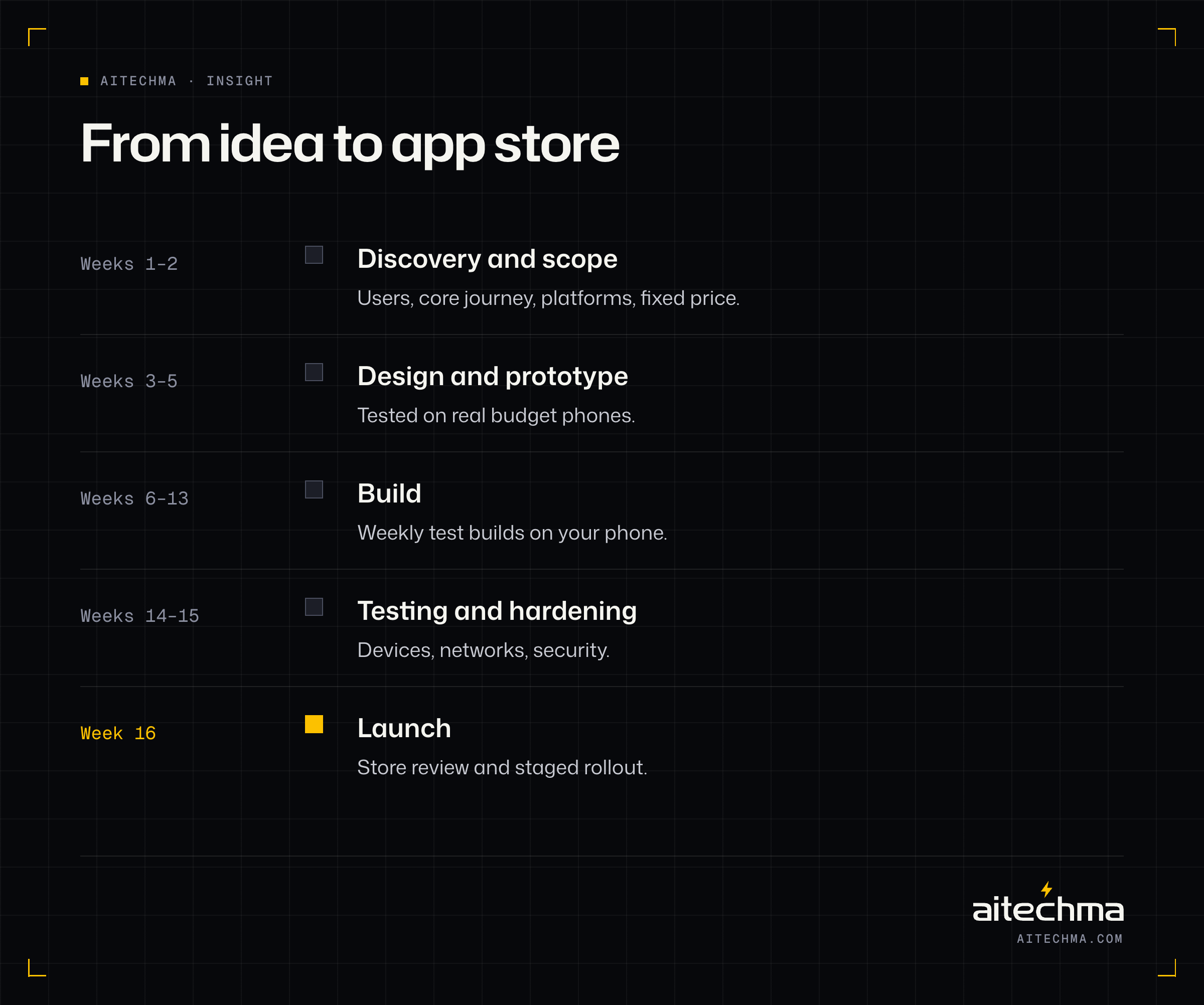
For a focused cross-platform app with a backend and admin dashboard, a well-run project typically looks like this:
Phase | Typical length | What happens |
|---|---|---|
Discovery and scope | 1–2 weeks | Users, core journey, features, platforms, fixed price |
Design and prototype | 2–3 weeks | Clickable prototype tested on real phones |
Build | 6–8 weeks | Weekly test builds on your phone |
Testing and hardening | 1–2 weeks | Devices, networks, security, store preparation |
Launch | 1 week | Store review, staged rollout, monitoring |
Fintech, marketplaces and real-time products add time for compliance, integrations and testing. The fastest projects are the ones where decisions are made quickly and the first version stays focused.
How to choose a mobile app development company
Use these questions to separate teams that ship real apps from teams that ship demos:
Can we download apps you have built, and speak to one of the clients? Store listings are public proof.
How do you test on budget Android phones and slow networks? Listen for specifics.
Who builds the backend and admin dashboard? It should be the same team, or a clearly coordinated one.
How will we see progress? Weekly test builds you can install are the gold standard.
Who owns the code, store accounts and designs? You should, in writing.
What happens after launch? Bug fixes, updates for new OS versions and support.
How do you handle payments and security? Ask about idempotency, reconciliation and where secrets are stored.
Common mistakes to avoid
Building every feature for version one. Launch the core journey, then add what users ask for.
Designing on flagship phones. Test on the phones your users carry.
Forgetting the admin dashboard. Your team needs tools to run the product.
Skipping analytics. Without data, every decision after launch is a guess.
Ignoring data and app size. Heavy apps get uninstalled.
Storing balances as a single number. Use a ledger for anything that holds money.
Launching without a growth plan. Downloads do not arrive on their own.
Putting store accounts in a developer's name. You may lose your app if the relationship ends.
How Nigerian apps make money
Deciding how the app will earn money changes what you build, so settle it before design starts. These are the models we see work in Nigeria, and what each needs from the product.
Transaction fees. Common in fintech, logistics and marketplaces: you earn a fee or margin on each payment, delivery or order. You need a reliable payment flow, clear fee disclosure before every transaction and reconciliation so you know exactly what you earned.
Subscriptions. Common in learning, productivity and business tools. Prices in naira, sensible tiers and flexible payment methods matter, because card-only billing excludes many users. Many products offer weekly or monthly plans alongside annual ones to match how users budget.
Freemium. A useful free tier with paid upgrades. It works when the free tier delivers real value and the paid tier removes a clear limit, such as more practice tests, more transfers or more team members.
Commission marketplaces. Sellers or service providers pay a share of each sale. You need seller onboarding, payouts, dispute handling and tools that make sellers want to stay.
Business clients. Some consumer-looking apps actually earn from businesses: schools paying for student access, employers paying for staff benefits, merchants paying for customer tools. That often changes the product, adding admin dashboards, reporting and bulk onboarding.
Advertising. Possible at large scale, but rarely a good primary model for a new Nigerian app, because ad rates are low and ads hurt the experience on slow connections.
Whichever model you choose, build the measurement in from day one: what each user pays, how often and what makes them stop.
Notifications and WhatsApp: engaging without annoying
Notifications are the cheapest way to bring users back and the fastest way to get uninstalled. A few principles keep you on the right side of that line.
Send only what the user would want to know. Transaction confirmations, order updates and reminders they asked for. Avoid generic "we miss you" messages.
Let users choose. Clear notification settings by type, so users can turn off promotions without losing transaction alerts.
Match the channel to the message. Push notifications for in-app events, SMS for critical security codes, WhatsApp for conversations and updates users have opted into, and email for receipts and statements.
Watch the cost. SMS and WhatsApp Business messages are billed per message, so a careless reminder campaign can become an expensive one. Measure the return of every automated message.
Respect quiet hours. Nobody wants a promotion at 2am.
Many Nigerian products also give users a WhatsApp support line. It is often the channel users trust most, and with good tooling your team can see the user's account context and recent transactions while they chat.
Data protection and privacy
Mobile apps collect a lot of personal data: names, phone numbers, contacts, location, identity numbers and financial records. The Nigeria Data Protection Act sets rules for how that data must be handled, and some sectors have extra rules on top. Engineering choices make compliance much easier:
Collect only what you need. Every permission and field should have a clear purpose. Never request contacts or photo access unless the feature truly needs them; misuse of borrowers' contacts has been a major regulatory issue for loan apps.
Explain clearly. Tell users what you collect and why, in plain language, at the moment you ask.
Record consent. Keep a record of what each user agreed to and when.
Protect identity data. BVN, NIN and document images need strict access controls and encryption.
Plan for deletion. Users may ask for their data to be deleted, so know where all their data lives.
Check where data is stored. Payment companies in particular may face rules about keeping data in Nigeria, so confirm your hosting and analytics choices with your counsel early.
Planning version 2
The best time to plan version 2 is before version 1 launches, because it keeps version 1 focused. Keep a simple "not yet" list of every feature you decided to leave out, with the reason. After launch, decide what goes into version 2 using evidence:
What users ask for repeatedly in support conversations and reviews.
Where the data shows drop-off, such as a step in onboarding or checkout that loses many users.
What would unlock revenue, such as a paid tier, a new payment method or a business plan.
What reduces your operating cost, such as automating something your team does by hand.
Release in small, frequent updates rather than one big version 2. Users notice steady improvement, and small releases are easier to test and roll back.
Before you brief a team: questions to answer yourself
You will get better quotes, and a better app, if you can answer these before your first meeting with a development team:
Who is the first user, specifically, and what problem does the app solve for them today?
What is the one thing a new user must be able to do in their first session?
How will the app make money, and roughly how much per user?
Which platforms do your first users carry, and do you need both stores at launch?
Which payments, identity checks or existing systems must it connect to?
Are there regulatory requirements, for example in fintech, health or education?
What is your budget range and the date you need to launch, and why that date?
How will you get your first thousand users?
If any answer is "I'm not sure", that is fine. A good team will help you work it out during discovery, but knowing which questions are open saves time and money.
Example: a learning app built for exam season
To make this concrete, consider an exam-preparation app for secondary school students, similar in shape to products our team has built. Students practise past questions for national exams, sit timed mock tests and see explanations for answers they got wrong.
The Nigerian context shapes every decision. Students often share phones with family, have little storage and buy data in small bundles. So the app downloads question banks in small, subject-by-subject packs that students choose, works fully offline once a pack is downloaded, and syncs scores only when a connection is available. Explanations are text-first, with optional images, to keep data use low.
Exam season brings sudden traffic spikes. The backend is load-tested at many times normal traffic before the season, and the busiest features, such as fetching a mock test, are served from a cache rather than built on every request.
Payment is a small subscription. Students and parents can pay by card, transfer or USSD, and a free tier lets students try a subject before paying. Most growth comes from teachers and student ambassadors sharing the app in WhatsApp groups, so the app makes it easy to share a single question or a mock-test score as an image with a link.
The result is a product that feels fast on the phones students actually carry, which matters far more than visual flourish.
Maintaining your app after launch
An app needs care long after release:
Operating system updates. Android and iOS release new versions every year, and stores require apps to target recent versions. Budget for at least yearly updates.
Library and SDK updates, including payment and identity provider SDKs that change their APIs.
Crash and performance fixes as new devices and OS versions appear.
Security patches when vulnerabilities are found in dependencies.
Feature releases based on what users ask for and what the data shows.
A small monthly product retainer usually costs less than emergency fixes when an outdated app is removed from a store or a payment SDK stops working.
Working well with your development team
The relationship with your team shapes the app as much as the technology does. These habits make projects faster and calmer:
Name one decision-maker. Teams slow down when every choice needs a committee. One person on your side should be able to say yes or no within a day.
Install every weekly build. Use the app on your own phone, on mobile data, and send feedback the same week. Problems found early cost a fraction of problems found at launch.
Keep a single list of changes. New ideas are welcome, but put them on the "not yet" list unless they replace something already planned.
Bring real users in early. Five people from your target audience testing a prototype will teach you more than weeks of internal debate.
Agree what "done" means. For each feature, write down what a user must be able to do and how you will check it.
Talk about money and dates openly. If the budget or deadline changes, say so immediately so the team can adjust scope instead of rushing quality.
Teams that work this way ship apps that feel considered, because every week of the project was spent building what users needed rather than reworking misunderstandings.
Glossary
Cross-platform: one codebase that produces apps for both Android and iOS.
Native: apps built separately in each platform's own language and tools.
Backend: the servers, database and business logic behind an app.
API: the interface the app uses to talk to the backend.
Push notification: a message sent to a user's phone even when the app is closed.
Idempotency: making sure repeating an action, such as a payment request, only applies it once.
Staged rollout: releasing an update to a percentage of users before everyone.
Activation: the moment a new user gets real value from the app for the first time.
Retention: how many users keep coming back over time.
KYC: "know your customer" identity checks, such as BVN or NIN verification.
Frequently asked questions from founders
Can I build an app without a technical co-founder? Yes. Many successful products are built by non-technical founders working with a capable team. What you need is someone you trust to translate business goals into technical decisions and to tell you honestly what not to build yet. A fractional CTO can play that role until you hire one.
Should I hire freelancers or an agency? Freelancers can be excellent for well-defined pieces of work. For a product with an app, a backend, an admin dashboard and integrations, a coordinated team usually ships faster and leaves fewer gaps, because someone is accountable for the whole.
How do I protect my idea? Sign an NDA before sharing details, make sure your contract assigns all code and IP to you, and keep store accounts, repositories and cloud accounts in your company's name.
How Aitechma can help
Aitechma is a software engineering company in Ikeja, Lagos. Our team built EPass, an exam-preparation app covering four national exams, and worked on v1 of Zabira and Grip, fintech apps used by hundreds of thousands of Nigerians. We build Android-first, cross-platform apps with their backend and admin dashboard included, test them on the phones and networks your users actually have, and stay after launch to help you reach your first paying users.
See how we build mobile apps, start with an MVP or get an instant estimate.
Frequently asked questions
It depends on features, integrations and quality more than screens. A focused first version with one core journey, one or two integrations and an admin dashboard is usually a two-to-three-month project with a small senior team. Fintech, marketplace and real-time apps cost more.
For most business, fintech, commerce and learning apps, a cross-platform framework such as Flutter or React Native gives near-native quality at lower cost. Choose native for heavy graphics, complex background work or the latest platform features.
Often yes, because most Nigerian smartphone users are on Android. Launch on both stores at once if your users are diaspora, corporate or high-income customers, where iOS is more common.
Roughly one to two weeks of discovery, two to three weeks of design, six to eight weeks of building and one to two weeks of testing before launch, for a focused cross-platform app.
Small download size, low data use, offline caching, safe retries on slow networks, clear pricing in naira, visible support such as WhatsApp, and testing on budget Android phones.
Sources
- Techeconomy. Nigeria internet subscriptions rise to 157.4 million as broadband penetration hits 56.1% in May (2026)
- IFC. Nigeria MSME Finance Market Bite (2022)
Need help with mobile apps?
Talk to the Aitechma team in Ikeja about your product, timeline and the fastest path to a working release.
See mobile apps